
MongoDB

How to create an app in MongoDB?

How to create an app in MongoDB?

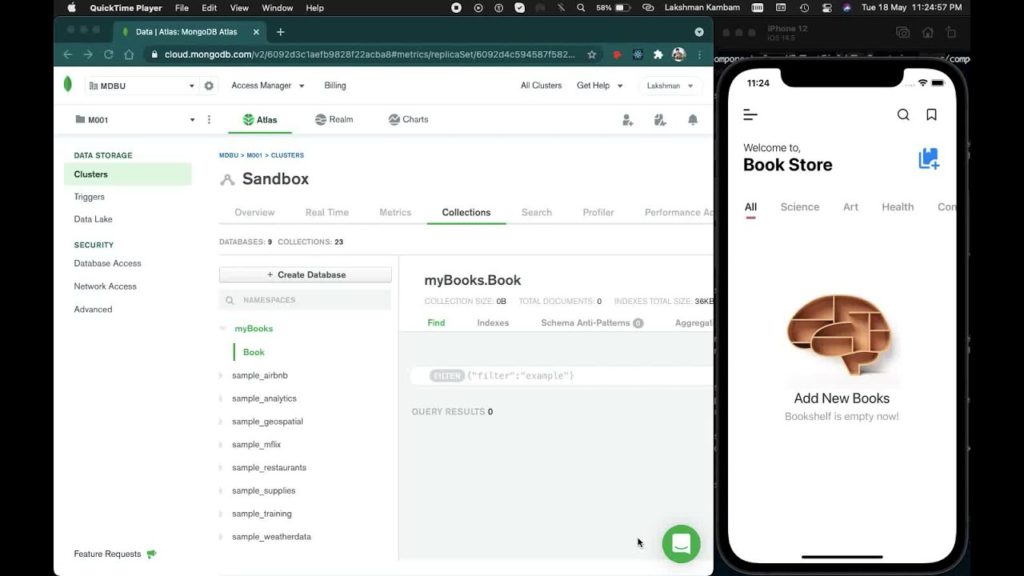
MongoDB is a powerful and popular NoSQL database that has been used to create a variety of web and mobile applications. It provides a flexible and scalable platform for managing large amounts of unstructured data, making it a perfect fit for modern app development. In this article, we will explore the steps involved in creating an app in MongoDB, with a focus on reactjs developers. Step 1: Define the App Requirements The first step in creating an app in MongoDB is to define the requirements. This involves identifying the features, functionalities, and user experience that the app will provide. As a ReactJS developer, it is essential to have a clear understanding of the front-end requirements, including the UI/UX design, user flows, and navigation. At the same time, you will need to work closely with the back-end developers to ensure that the app’s data management requirements are clearly defined. This will involve identifying the data models, relationships, and access controls needed to manage the app’s data. Step 2: Design the App Architecture Once the requirements are defined, the next step is to design the app architecture. This involves deciding on the technologies, frameworks, and platforms that will be used to build the app. As a ReactJS developer, you will need to work closely with the back-end developers to ensure that the front-end and back-end technologies are compatible. MongoDB is a great choice for the back-end database, as it provides the flexibility and scalability needed to manage large amounts of unstructured data. It also has a robust set of tools and integrations that make it easy to develop and manage the database. For the front-end, ReactJS is an ideal choice for building modern, dynamic user interfaces. It provides a powerful set of tools and features that make it easy to develop and maintain complex UI components. Step 3: Set Up the MongoDB Database With the app requirements and architecture defined, the next step is to set up the MongoDB database. This involves creating the database schema, defining the data models, and setting up the access controls. MongoDB provides a flexible schema that makes it easy to store unstructured data. This means that you can store data in the database without having to define a strict schema beforehand. However, it is still essential to define the data models and relationships to ensure that the data is stored and retrieved correctly. As a ReactJS developer, you will need to work with the back-end developers to define the API endpoints that will be used to access the database. This will involve defining the CRUD operations (Create, Read, Update, Delete) and setting up the authentication and authorization controls. Step 4: Build the Front-End User Interface With the back-end database set up, the next step is to build the front-end user interface. This involves creating the UI components, integrating them with the back-end API, and testing the UI for usability and functionality. ReactJS provides a powerful set of tools and features that make it easy to develop complex UI components. This includes tools for state management, routing, and data binding, which can be used to build dynamic, responsive user interfaces. As a ReactJS developer, you will need to work closely with the UI/UX designers to ensure that the UI components are aligned with the app’s design requirements. You will also need to test the UI components for usability and functionality, ensuring that they work seamlessly with the back-end API. Step 5: Integrate the Front-End and Back-End With the front-end and back-end components built, the final step is to integrate them and test the app as a whole. This involves ensuring that the front-end UI components can communicate seamlessly with the back-end API, and that data is being stored and retrieved correctly. Related: What is difference between SQL and MongoDB?
What is difference between SQL and MongoDB?

What is difference between SQL and MongoDB?

SQL and MongoDB are two popular database systems that serve different purposes and have distinct differences. SQL, or Structured Query Language, is a relational database system, while MongoDB is a NoSQL database system. Both have their advantages and disadvantages, and choosing between the two depends on the specific needs of a project. In this article, we will explore the differences between SQL and MongoDB, with a focus on how ReactJS development companies can benefit from using either system. Data Modeling One of the main differences between SQL and MongoDB is how they handle data modeling. SQL uses a table-based approach, where data is organized into rows and columns. Each table represents a specific entity, and relationships between entities are managed through foreign keys. This makes SQL ideal for managing structured data, such as financial records, inventory, or customer data. On the other hand, MongoDB is a document-oriented database that stores data in JSON-like documents. Each document can have a different structure, which makes it suitable for managing unstructured data, such as social media feeds, user-generated content, and machine-generated data. This also makes it easier to add or modify fields without having to alter the entire schema. As a reactjs development company, the choice of data modeling system will depend on the type of data being managed. If the data is structured, then SQL may be the better choice. If the data is unstructured, then MongoDB may be the better choice. Scalability Another key difference between SQL and MongoDB is scalability. SQL databases are vertically scalable, which means that they can only handle more traffic by adding more resources, such as CPU, RAM, or storage. This can lead to performance issues, as the database becomes more complex and requires more resources to maintain. On the other hand, MongoDB is horizontally scalable, which means that it can handle more traffic by adding more servers to the cluster. This makes it ideal for managing large volumes of data, as it can distribute the load across multiple servers. As a ReactJS development company, the choice of scalability system will depend on the expected traffic and data volume. If the project is expected to handle large volumes of data, then MongoDB may be the better choice. Query Language The query language is another difference between SQL and MongoDB. SQL uses a standardized query language that is used to extract and manipulate data from the database. This makes it easy to use and widely adopted, as developers can easily switch between different SQL databases. On the other hand, MongoDB uses a proprietary query language that is designed to work with JSON-like documents. This makes it easy to work with unstructured data, as the query language can handle complex structures and nested documents. As a ReactJS development company, the choice of query language will depend on the type of data being managed. If the data is structured, then SQL may be the better choice. If the data is unstructured, then MongoDB may be the better choice. Flexibility Flexibility is another key difference between SQL and MongoDB. SQL databases require a predefined schema, which means that the data model needs to be defined upfront. This makes it difficult to modify the schema once the database is in use. On the other hand, MongoDB does not require a predefined schema, which makes it easy to store data of any type and structure. This makes MongoDB ideal for managing large amounts of unstructured data, such as social media feeds, user-generated content, and machine-generated data. As a ReactJS development company, the choice of flexibility system will depend on the type of data being managed. If the data is unstructured, then MongoDB may be the better choice. Related: How to create an app in MongoDB?

Comparison between MongoDB Atlas and MongoDB compass

Comparison between MongoDB Atlas and MongoDB compass

MongoDB is a popular NoSQL database system used by developers around the world. It is known for its scalability, flexibility, and ease of use. MongoDB provides developers with various tools to manage their databases, including MongoDB Atlas and MongoDB Compass. In this article, we will compare MongoDB Atlas and MongoDB Compass and help you choose which tool is right for your needs. MongoDB Atlas MongoDB Atlas is a cloud-based service that provides managed MongoDB clusters. It offers an easy-to-use interface that allows developers to create, configure, and manage their MongoDB databases with ease. MongoDB Atlas is a fully managed service that provides automated backups, upgrades, and security patches. One of the main advantages of using MongoDB Atlas is its scalability. It allows developers to scale their databases easily, and it can handle large amounts of data without any issues. MongoDB Atlas also provides global coverage, allowing developers to deploy their databases in multiple regions for low-latency access. Another advantage of MongoDB Atlas is its security features. It provides end-to-end encryption, network isolation, and access control, ensuring that your data is secure and protected. MongoDB Compass MongoDB Compass is a GUI tool that allows developers to visualize and explore their MongoDB databases. It offers an intuitive interface that allows developers to easily create, update, and delete documents, indexes, and collections. MongoDB Compass also provides a query builder, which allows developers to create complex queries without writing any code. One of the main advantages of using MongoDB Compass is its ease of use. It provides a graphical interface that makes it easy for developers to navigate and manage their databases. It also provides a real-time view of the data, allowing developers to see changes in real-time. Another advantage of MongoDB Compass is its flexibility. It provides developers with a powerful set of tools for managing their databases, including a query builder, aggregation pipeline builder, and schema analyzer. This makes it easy for developers to work with their data and make changes as needed. Comparison Now that we have looked at the advantages of MongoDB Atlas and MongoDB Compass, let’s compare them. Scalability MongoDB Atlas is designed for scalability, providing developers with an easy way to scale their databases. It can handle large amounts of data without any issues, and it provides global coverage for low-latency access. MongoDB Compass, on the other hand, is not designed for scalability. It is a tool for managing and exploring databases, but it does not provide any features for scaling databases. Ease of Use MongoDB Atlas provides an easy-to-use interface that allows developers to create, configure, and manage their databases with ease. It also provides automated backups, upgrades, and security patches, making it easy for developers to focus on their applications. MongoDB Compass also provides an intuitive interface that makes it easy for developers to navigate and manage their databases. It provides a real-time view of the data, allowing developers to see changes in real-time. Security MongoDB Atlas provides end-to-end encryption, network isolation, and access control, ensuring that your data is secure and protected. It also provides automated backups and disaster recovery, ensuring that your data is always safe. MongoDB Compass does not provide any security features. It is a tool for managing and exploring databases, but it does not provide any features for securing the data. Flexibility MongoDB Atlas provides developers with a fully managed service that offers automated backups, upgrades, and security patches. It is designed for scalability and can handle large amounts of data. MongoDB Compass provides developers with a powerful set of tools for managing their databases, including a query builder, aggregation pipeline builder, and schema analyzer. It is designed for exploring and managing databases, but it does not provide any features for scaling databases. More to read: Different features of MongoDB and how it works

Different features of MongoDB and how it works

Different features of MongoDB and how it works

MongoDB is a popular NoSQL database system that is known for its flexibility, scalability, and ease of use. It is used by developers around the world to manage their data in a variety of applications. In this article, we will discuss the different features of MongoDB and how it works. Data Model MongoDB uses a document data model, which means that data is stored in documents rather than in rows and columns. Documents are stored in collections, which are similar to tables in a relational database. Each document can have a different schema, and the schema can be changed dynamically without affecting the other documents in the collection. Indexes Indexes are used to speed up queries in MongoDB. They can be created on any field in a document, and they are automatically created on the _id field. Indexes can be created in the background, which means that they do not impact the performance of the database. MongoDB supports a variety of index types, including single-field indexes, compound indexes, and text indexes. Aggregation MongoDB provides a powerful aggregation framework that allows developers to perform complex queries on their data. The aggregation framework can be used to group and filter data, perform calculations, and transform data. The aggregation framework is similar to SQL’s GROUP BY clause, but it is more powerful and flexible. Replication Replication is used to provide high availability and data redundancy in MongoDB. Replication works by maintaining multiple copies of the data across multiple servers. When one server fails, another server takes over, ensuring that the data is always available. MongoDB supports replica sets, which are groups of servers that maintain multiple copies of the data. Sharding Sharding is used to horizontally partition data in MongoDB. Sharding allows developers to distribute data across multiple servers, which can improve the performance and scalability of the database. MongoDB uses a sharding key to partition data, and it automatically distributes data across the shards. Sharding can be used in combination with replication to provide both high availability and scalability. GridFS GridFS is a specification for storing and retrieving large files in MongoDB. GridFS stores files in two collections, one for the file’s metadata and one for the file’s data. GridFS is useful for storing large files, such as images, videos, and audio files. How MongoDB Works MongoDB uses a client-server architecture. The MongoDB server runs as a daemon process, and clients connect to the server using a driver. MongoDB drivers are available for many programming languages, including Java, Python, and JavaScript. When a client sends a request to the server, the server processes the request and returns a response. Requests can be simple queries, such as finding a document by its ID, or they can be more complex operations, such as inserting or updating documents. MongoDB uses memory-mapped files to store data on disk. When a client requests data, the server loads the relevant portions of the data into memory. This means that MongoDB can provide fast read and write performance, even with large amounts of data. MongoDB uses write-ahead logging to ensure that data is not lost in the event of a system failure. When a write operation is performed, it is first written to a transaction log. Once the write is complete, the data is written to the database. If the system crashes before the data is written to the database, MongoDB can use the transaction log to recover the data. Conclusion In conclusion, MongoDB is a powerful NoSQL database system that offers many features to developers. Its flexible document data model, powerful aggregation framework, and support for replication and sharding make it a popular choice for many applications. MongoDB’s use of memory-mapped files and write-ahead logging ensure that it provides fast read and write performance and data durability. MOre to read: Comparison between MongoDB Atlas and MongoDB compass